LiveProfessor

LiveProfessor is a live oriented plugin host for Windows and MacOS.
LiveProfessor makes it easy to create a powerful, portable and flexible effect rack using VST or AU plugins.

The software was developed in close collaboration with experienced audio professionals from live sound, theatre and broadcast, and is now used all over the world.


Signal Chains

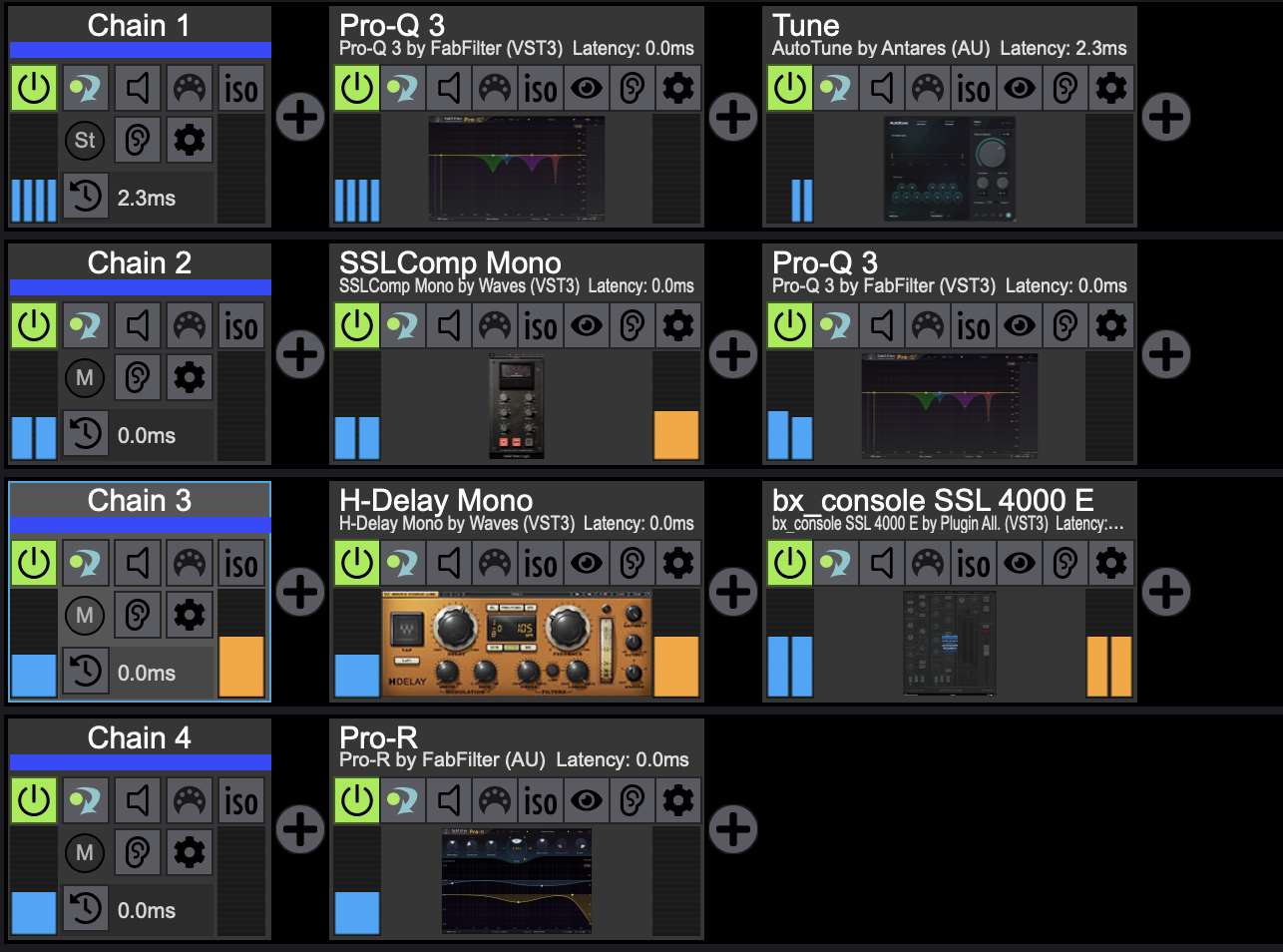
A Signal Chain is a collection of plugins connected in series. Organize plugins into dedicated processing chains for individual channels, instruments, or tasks, making even complex projects easy to manage. For example, all plugins used to process a bass guitar can be grouped into a dedicated "Bass Guitar" chain.

Snapshot automation

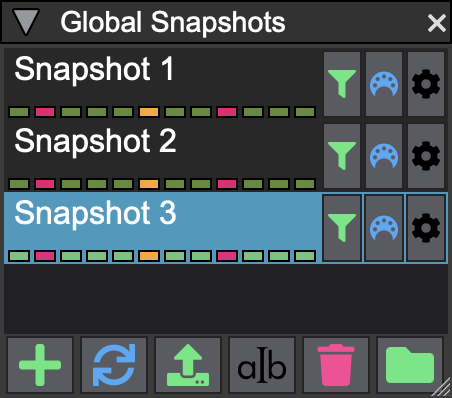
LiveProfessor comes with extensive snapshot automation. Seamlessly switch between snapshots that save individual plugin settings, or global snapshots that recover the entire state of a project.

Hardware controllers

LiveProfessor also features an extensive system of hardware controllers, to allow you to control plugin parameters and program functions. We’ve worked hard to make this system as flexible as possible, while at the same time quick and easy to use. What’s more, each control can be tweaked to respond just how you want it to.

Cue lists

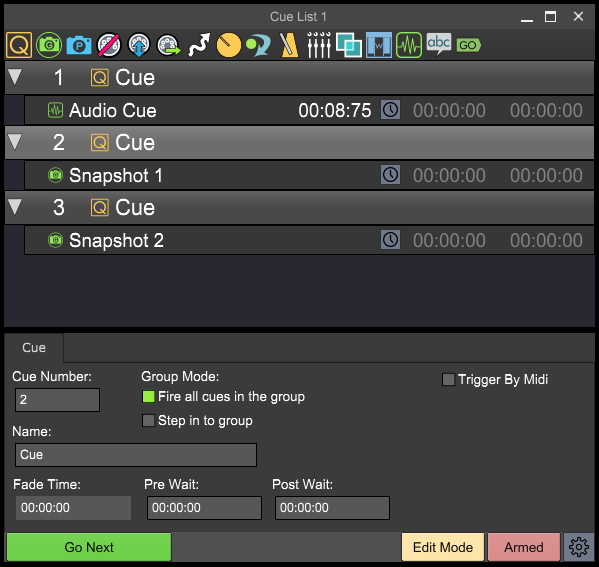
Cue lists allow you to seamlessly change LiveProfessor’s settings during a live performance. Some of these cues include recalling a snapshot, changing audio routing, sending midi messages, and altering project tempo. You can easily recall these on the fly to get the right settings for each individual song.

Midi Modifiers

Each plugin has a set of powerful Midi Modifiers. These are especially useful for keyboard players, with functions such as transpose, key-zone and filter.

Snapshot Automation

LiveProfessor has extensive snapshot automation. There are two types of snapshots. Global Snapshots store and recall the entire setup, while plugin snapshots contain settings only for a specific plugin, more like presets.

The Global Snapshots can be filtered so that you can decide what should be recalled in each snapshot.

Snapshots can be used together with the cue lists to recall settings during a performance

Signal Chains

LiveProfessor offers two ways to organize plugins: as individual plugins connected freely in Wire View, or as Signal Chains.

A Signal Chain is a collection of plugins connected in series. Chains provide a convenient way to organize related processing, for example by grouping all plugins used for a bass guitar into a dedicated chain.

Signal Chains support any bus format, from mono and stereo to multichannel and immersive audio formats. Plugins can be reordered using drag and drop, replaced at any time, or bypassed individually or as an entire chain.

For plugins that introduce additional latency, Signal Chains can be time-aligned to maintain phase coherence across parallel processing paths.

Cue Lists

As one of the most powerful features of LiveProfessor, the Cue Lists lets you program shows for instant recall of all LiveProfessor settings.
The cue list is built up with different cue types, like “Recall Snapshot”, “Send MIDI” and “Map Controller”. With the many cue types available you can make each cue as simple or complex as you like. The cue list can be stepped through as a sequence, or each can be triggered individually by external gear.

Everything in LiveProfessor can be controlled using the cue list, it can even playback audio files


LiveProfessor user's pictures

Wigan Music Services event in Wigan for leisuretecukltd using a digico.official SD10, ableton , audiostrom live professor, wavesaudio and elgato stream deck
Anoche en Caracas - Venezuela 🇻🇪 acompañando a marcela_gandara y su tremendo equipo de trabajo. 
Gracias por la confianza 🫶🏽🙏🏽

Y bueno disfrutando de la yamaha_proaudio_official DM7 + live.professor con plugin alliance para finalizar las mezclas de monitores y el neutralaudio en el Lead Vocal Mix + Shure PSM 1000 + Shure Axient. shure 

Gracias al soporte técnico de la compañía grupotuandamio 
excelente servicio.
Hoy tuve el gusto de conversar un rato sobre audio con un amigo que es un referente acá en la ciudad, luego de la conversación, llegábamos a la siguiente conclusión: hoy día en sonido en vivo todos estamos muy preocupados por mezclar y aprender técnicas de mezcla y lo relacionábamos con pintar, hoy día la tecnología nos está dando muchas herramientas como los plugins que nos sirven para “dibujar y pintar”. Pero en la mayoría de los casos por enfocarnos tanto en esas herramientas, estamos olvidando de algo esencial y es el lienzo sobre el cual vamos a pintar. 
Es importante aprender a mezclar pero también es muy importante saber ajustar un sistema de sonido para que todo ese esfuerzo anterior tenga una traducción coherente y la obra pueda ser apreciada de una mejor manera.
Just bought a Midi Fighter Twister from djtechtools for better control of audiostrom live.professor
Integração Liveprofessor+Conpanion+StreamDeck.

#audio #integração #software #liveprofessor2 #wavesaudio #backstage #companion #streamdeck #macbook #apple #autotune #tunner #afinação #aovivo #live #ql5 #insert #som #yamaha

Some videos to get you started